Why was this order rejected? Your FIX log has the answer.
Your FIX logs never leave the computer that reads them: no log data is sent. The only network call is the licence check: activation needs one connection to api.gumroad.com from that computer (in a Remote-SSH, WSL or dev container window, the remote computer), through your VS Code proxy settings; after that, Pro works offline. Without a licence key, the extension makes no network call.
Free · Pro EUR 65.83 + VAT where applicable, one-time purchase
- No log data leaves your machine
- No network call without a licence key
- FIX 4.2, 4.4 and FIX Latest dictionaries
How it works
Three steps, no account, no log leaves your machine.
- Open the logQuickFIX, QuickFIX/J and QuickFIX/n message logs (*.messages.log) open in the FIX log view. Any other file: right-click, Open as FIX log. Text pasted from an e-mail or a ticket: select it, then Decode the selected text.
- Read it decodedOne row per message, with the session, the direction, MsgSeqNum, the type and the ClOrdID. Select a message: every tag and value named, and, for a reject, why, in plain words.
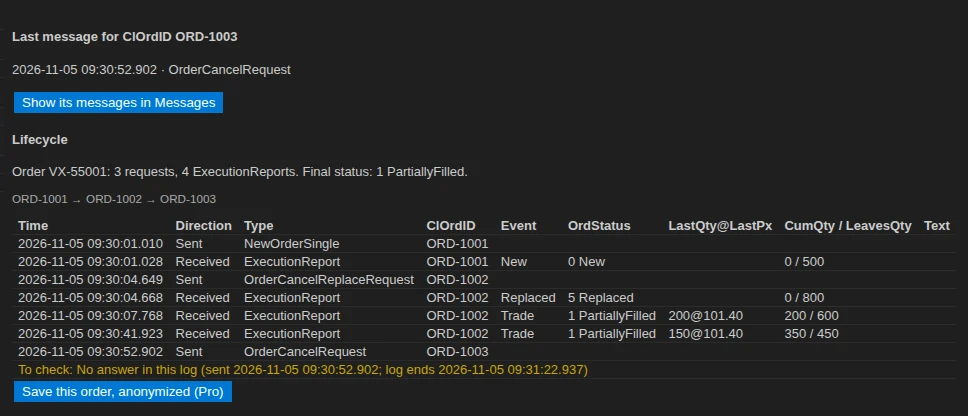
- Follow the orderThe Orders tab gives the last status of every ClOrdID. Pro follows it through each replace and cancel, matches each request with its answer, and lists what is still waiting.
What the extension does
A reader for FIX logs, not a FIX engine: it never connects to a session, never sends or replays a message, and opens your log read-only. It saves you counting tags by hand and searching the spec for what 39=8 or 103=99 means.
Why it was rejected
Why a message was rejected, in plain words: Reject (35=3), BusinessMessageReject (35=j), rejected orders (39=8) and OrderCancelReject (35=9), with a link to the rejected message
Every tag and value named
Every message decoded with tag and value names: FIX 4.2, FIX 4.4 and FIX Latest dictionaries from FIX Orchestra (FIX 5.0, 5.0 SP1 and 5.0 SP2 messages are read with FIX Latest), plus your own dictionaries in QuickFIX XML format for venue-specific tags
Wherever the message is in the line
Reads FIX messages wherever they are in a log line (8=FIX… to 10=): QuickFIX, QuickFIX/J and QuickFIX/n log files and application logs; SOH, | and ^A separators detected, several messages per line
The last status of every order
Order table: the last status of every ClOrdID (OrdStatus, CumQty, LeavesQty, OrderID) and its last message, with a link to all its messages. BodyLength (9) and CheckSum (10) checked on every message.
Order lifecycle (Pro)
Order lifecycle: the ClOrdID → OrigClOrdID chain through every replace and cancel, each request matched with its answer (ExecutionReport, OrderCancelReject, Reject or BusinessMessageReject), every ExecutionReport in order, and the lists of requests without an answer, orders still pending at the end of the log and executions to check (a fill after a final status, CumQty going down or above OrderQty)
Sequence gaps (Pro)
Session analysis: sequence gaps and how they were filled, ResendRequest, SequenceReset (gap fill or reset), MsgSeqNum too low, and the last in-order MsgSeqNum on each side. Free: logons and logouts of each session with their text, and the number of sequence gaps, ResendRequests and requests without an answer.
Anonymized copy (Pro)
Anonymized copy to send to a counterparty: the tags you choose (Account, PartyID, ClientID, OnBehalfOf, DeliverTo, SubIDs…) replaced by consistent stand-ins, BodyLength and CheckSum recalculated; the whole log, the filtered messages or one order. The anonymized copy replaces the values of the tags you choose, and the same values elsewhere in the lines. Check the copy before sending it.
Logs up to 1 GB (Pro)
Logs over 50 MB, up to 1 GB, read in a stream without freezing VS Code. Free: the first 50 MB of every log, and the screen says where reading stopped.
From an e-mail or a ticket
Tag names on hover in any text editor, and decoding of FIX messages pasted from an e-mail or a ticket.
Free, and Pro when you need it
The free version reads your logs, explains every reject and gives the last status of every order, with no time limit. Pro is for the support case: the whole life of an order, the session gaps, and a copy you can send to a counterparty. Paid once.
Free
No time limit, no account.
- Reads FIX messages wherever they are in a log line (8=FIX… to 10=)
- Tag and value names: FIX 4.2, FIX 4.4, FIX Latest and your QuickFIX XML dictionaries
- Rejects explained: 35=3, 35=j, 39=8 and 35=9
- Last status of every ClOrdID
- Filters by type, value or tag=value
- BodyLength (9) and CheckSum (10) checked
- Logons, logouts and the number of sequence gaps
- The first 50 MB of every log
- The ClOrdID → OrigClOrdID chain, requests matched with answers
- Sequence gaps detailed, ResendRequest and SequenceReset
- Anonymized copy
- Logs over 50 MB, up to 1 GB
Pro
One key for one person, on up to 5 machines. One-time purchase.
- Everything in the free version
- Order lifecycle: ClOrdID → OrigClOrdID chain, each request matched with its answer
- Requests without an answer, orders still pending, executions to check
- Sequence gaps and how they were filled: ResendRequest, SequenceReset, MsgSeqNum too low
- Anonymized copy of the whole log, the filtered messages or one order, BodyLength and CheckSum recalculated
- Logs over 50 MB, up to 1 GB, read in a stream
- Works offline once activated
Refund within 14 days. Payment, invoice and VAT handled by Gumroad, merchant of record.
Frequently asked questions
Are my logs sent anywhere?
Your FIX logs never leave the computer that reads them: no log data is sent. The only network call is the licence check: activation needs one connection to api.gumroad.com from that computer (in a Remote-SSH, WSL or dev container window, the remote computer), through your VS Code proxy settings; after that, Pro works offline. Without a licence key, the extension makes no network call. The licence check carries the product identifier and the key, never a message, a file or its content. No telemetry.
Which logs and FIX versions are read?
Reads FIX messages wherever they are in a log line (8=FIX… to 10=): QuickFIX, QuickFIX/J and QuickFIX/n log files and application logs; SOH, | and ^A separators detected, several messages per line. Dictionaries: FIX 4.2, FIX 4.4 and FIX Latest (as of Extension Pack 312) from the FIX Orchestra repository (Apache License 2.0). FIX 4.0 and 4.1 are read with the FIX 4.2 dictionary, FIX 4.3 with FIX 4.4. FIXT.1.1 sessions with FIX 5.0, 5.0 SP1 or 5.0 SP2 messages (ApplVerID 1128, or DefaultApplVerID 1137 of the Logon) are read with the FIX Latest dictionary. The header says which dictionary each version uses. Tags specific to a venue come from your own dictionary in QuickFIX XML format.
What is not covered?
Not covered in this version: FIXML, binary encodings (SBE, FAST) and network captures; following a log while it grows (a banner offers Reload when the file grows or changes); NewOrderList (E), multileg orders (AB, AC), quotes and mass cancels are decoded but not followed in the order view; checking required fields and field order against the dictionary (only BodyLength and CheckSum are checked); editing, sending or replaying messages; connecting to a FIX session; files on a virtual file system (copy them to a folder on this computer). A message of more than 50,000 fields is listed as an unread fragment (its values are still masked in an anonymized copy). Free version: the first 50 MB of each file are read, and the screen says where reading stopped. Pro reads files up to 1 GB; beyond, the first 1 GB are read and the screen says where reading stopped.
What is the difference between free and Pro?
Free decodes every message, explains every reject, gives the last status of every ClOrdID, checks BodyLength and CheckSum and counts sequence gaps, on the first 50 MB of each log. Pro follows each order through its replaces and cancels, details the session (gaps, ResendRequest, SequenceReset), writes anonymized copies and reads logs up to 1 GB.
Can I send the anonymized copy to a counterparty as is?
The anonymized copy replaces the values of the tags you choose, and the same values elsewhere in the lines. Check the copy before sending it. You choose the tags (Account, PartyID, ClientID, OnBehalfOf, DeliverTo, SubIDs…); passwords (554, 925) are always masked.
On how many machines can I use my key?
One key for one person, on up to 5 machines. A machine is counted the first time the key is activated in a VS Code installation: a new computer, VS Code reinstalled with its data erased, or a non-persistent virtual desktop whose identifier changes. Entering the key again, trying again after a network error, removing and re-entering it on the same installation, or updating the extension uses nothing. New computer or VS Code reinstalled? Write to support@novair.app with your purchase e-mail and we reset the count.
How much is it, and can I get an invoice with or without VAT?
Pro costs EUR 65.83 + VAT where applicable, paid once; Gumroad, merchant of record, shows the exact amount for your country at checkout. Need an invoice? Use the “Generate” link at the bottom of your Gumroad receipt: enter your name and business address, add what your accounts need under “Additional notes”, and download the PDF. An EU business that paid VAT can enter its VAT number there: Gumroad refunds the VAT and the invoice shows no VAT. Gumroad cannot change an invoice afterwards.
How do I activate Pro?
Open the Command Palette (Ctrl+Shift+P, Cmd+Shift+P on a Mac), type “licence key”, choose FIX Log: Enter my Pro licence key and paste the key from your Gumroad receipt.
My company network blocks Gumroad. What happens?
Activation needs one connection to api.gumroad.com, through your VS Code proxy settings. If it cannot get through, the free version keeps working, and you can ask for a refund within 14 days at support@novair.app.